Real chip temperature, no sudo
Reads the Apple Silicon sensors in-process through IOKit. No terminal commands, no admin password, no helper tool.
Brasa · Mac temperature monitor
Brasa is a light menu bar app for Apple Silicon Macs. It watches the chip, battery and SSD temperature, memory pressure, fans and the macOS thermal state, and tells you in plain words when to stop a heavy job.
Notarized download coming soon. For now, build it in one command (see the README).

Numbers are easy to ignore. Brasa turns them into a state, a reason and a next step.
Reads the Apple Silicon sensors in-process through IOKit. No terminal commands, no admin password, no helper tool.
Safe, warming up, too hot, critical. The stone in the menu bar changes color, and the panel explains the risk and the next step.
Defaults are 85, 92 and 100 °C for the chip. Change them in Settings; thresholds keep their order and each one resets to its default.
Battery and SSD temperature, memory pressure and swap, CPU and GPU load, fan speed, and the top processes heating the Mac.
Alerts when the level changes and when it cools down, with a cool-down margin so it does not nag you at the edge of a limit.
About 1% of one CPU core and ~55 MB of memory, read every 2 seconds. It makes no network requests and sends no data.
The stone in the menu bar changes color with the state of your Mac. Open it for the reason and the numbers behind it.
Everything within normal range.
Chip above 85 °C. Avoid starting a render or export.
Chip above 92 °C. Pause heavy work until it drops below 80 °C.
Chip above 100 °C or macOS is throttling hard. Close what is heavy now.
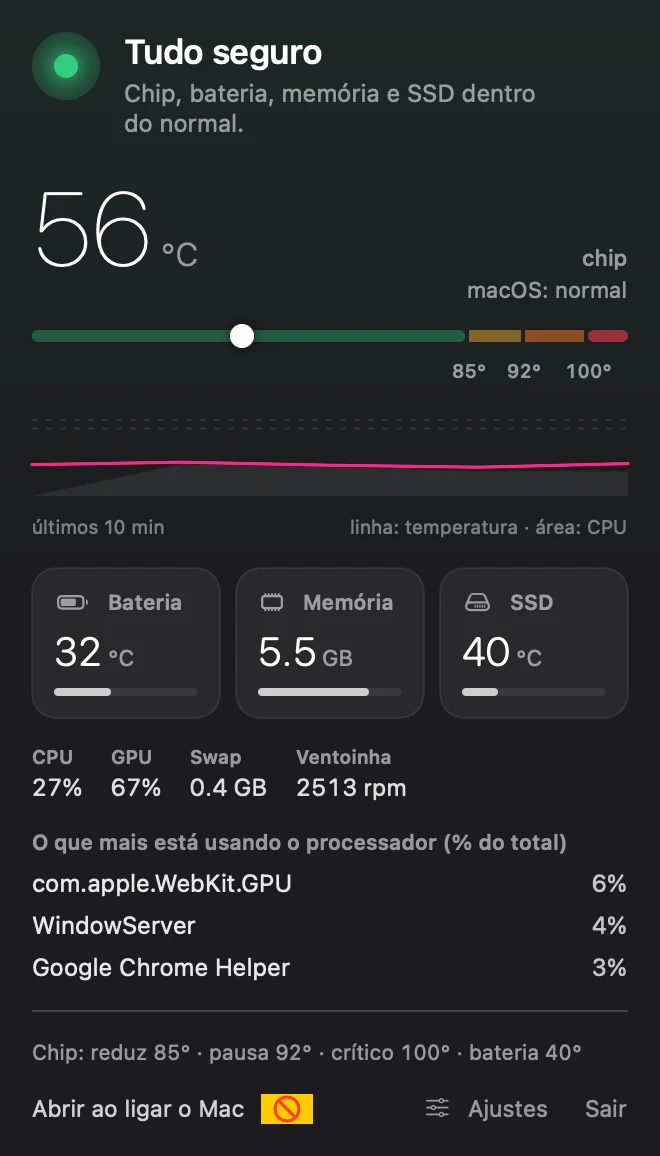
These are only the defaults. In Settings you change every threshold; they keep their order and each one can go back to its default.
No. It reads the sensors directly from the app, so there is no password prompt and no privileged helper.
Apple Silicon Macs (M1 to M4) on macOS 14 or later. It is developed on a MacBook Pro with M4 Pro; sensor names can vary between chips, so reports from other models are welcome. Intel Macs are not supported.
No. Brasa is a monitor: it shows fan speed and warns you, but it does not change fan curves.
Yes. The source is on GitHub under the MIT license. If it helps you, you can support the project.
No. Everything runs locally. The app makes no network requests and has no analytics.
Brasa focuses on safety: it turns temperatures into clear states with advice, keeps your own thresholds, and stays light. For full hardware dashboards or fan control, other tools are a better fit.
Brasa is free and open source. If it saved you from a hot Mac, you can help keep it going.
Free forever. Built in Brazil.